Tuesday, September 25, 2012

Object Oriented Programming Concept in JavaScript

JavaScript is dynamically type language unlike C# and VB which are statically typed. It means compile time validations are available in statically typed language(C#, VB) which is not possible in dynamically typed languages (JavaScript, python.Etc)

Object creation and instantiation are slightly different in JavaScript. Unlike Java, C++, C# etc, JavaScript does not contain class statement. JavaScript is a prototype-based language. JavaScript uses functions as classes.

There are 2 ways for creating and Instantiating a class in JavaScript.
1. Constructor function
//Creating a StudentCls class
function StudentCls (){
};
//Defining properties of StudentCls class
function StudentCls ()
{
this.name=’Bimlesh’;
this.id=’20001’;
};


//Defining Method inside StudentCls class
function StudentCls ()
{
this.name=’Bimlesh’;
this.id=’20001’;
this.PersonalInfo=function()
{
alert(‘Hi I am ‘+this.name);
}
};

//Object creation and properties, method access.
var objStu1=new StudentCls();
objStu1.name;
objStu1. PersonalInfo();
var objStu2=new StudentCls();
objStu2.name;
objStu2. PersonalInfo();
//Using a constructor function
function StudentCls (name,id)
{
this.name=name;
this.id=id;
this.PersonalInfo=function(message)
                          {
                          alert(message+this.name);
                          }
};

//Object creation and method access.
var objStu=new StudentCls(‘Bimlesh Singh’,’20001’);
objStu. PersonalInfo(‘Hi I am’);

2. Literal notation:
//Creating a StudentCls class
var StudentCls= {
};

//Defining properties of StudentCls class
var StudentCls= {
name:’Bimlesh’,
id:’20001’
};

//Defining Method inside StudentCls class
var StudentCls= {
name:’Bimlesh’,
id:’20001’,
PersonalInfo: function()
                    {
                 alert(‘Hi I am ‘+this.name);
                   }

};

//Object creation and properties, method access.
StudentCls.name;
StudentCls. PersonalInfo();
//Calling parameterized methods.
var StudentCls= {
name:’Bimlesh’,
id:’20001’,
PersonalInfo: function(message)
                     {
                    alert(message+this.name);
                     }
};

//Object creation and properties, method access.
StudentCls. PersonalInfo(‘Hi I am’);

Note: if you are using literal notation like below
var StudentCls= {
name:’Bimlesh’,
id:’20001’,
PersonalInfo: function(message)
                     {
                     alert(message+this.name);
                     }
};

var obj= StudentCls.name;
alert(obj);//it will work correctly

but if you are using this approach to method then you will get error saying ‘undefined’
var obj= StudentCls. PersonalInfo(“Hi I am”);
alert(obj);//it will through error.

//Correct approach use either .call or .apply method.
var obj= StudentCls. PersonalInfo;

alert(obj.call(StudentCls,’Hi I am’));
Note.for calling overloaded method we need to set first parameter name as class name and then values.
While using .apply instead of .call we need to pass array as second parameter.
var obj= StudentCls. PersonalInfo;
alert(obj.call(StudentCls,[’Hi I am’]));

UseFul Links:
1. http://net.tutsplus.com/tutorials/javascript-ajax/the-basics-of-object-oriented-javascript
2.http://viralpatel.net/blogs/object-oriented-programming-with-javascript

3. http://www.javascriptkit.com/javatutors/oopjs4.shtml

Thursday, September 13, 2012

What’s the difference between ‘Dynamic’, ‘Object’ and reflection?

Many developers think that ‘Dynamic’ objects where introduced to replace to ‘Reflection’ or the ‘Object’ data type. The main goal of ‘Dynamic’ object is to consume objects created in dynamic languages seamlessly in statically typed languages. But due to this feature some of its goals got overlapped with reflection and object data type.
Eventually it will replace reflection and object data types due to simplified code and caching advantages. 

Dynamic object is a small feature provided in the DLR engine by which we can make calls to objects created in dynamic languages. The big picture is the DLR which helps to not only to consume, but also your classes can be exposed to dynamic languages.

Object / Reflection
Reflection and Object type is only meant for referencing types whose functions and methods are not know during runtime. Reflection and object type do not help to expose your classes to other languages. They are purely meant to consume objects whose methods are known until runtime

What is Dynamic Type Or define DLR?


Design Time/Compile Time Object:      In .net  programming we can access all the properties and functions at compile time only as illustrated in below example where we are accessing the method of Calculator class(calc.Add(10,20)).
e.g.
Calculator calc = GetCalculator();
Int sum = calc.Add (10, 20);
Run Time Object /Late Binding: In this Case compiler doesn’t checks for compile time error everything is handled at run time. The most important thing is that we can’t access the properties and methods while writing code.

If you wanted to do the exact same thing as in e.g. (like if it were some other class, maybe old-COM interop, or something where the compiler didn't know a priori that Add() was available, etc) you'd do this:
e.g.
object calc = GetCalculator ();
Type calcType = calc.GetType();
object res = calcType.InvokeMember("Add", BindingFlags.InvokeMethod, null, new object[] { 10, 20 });
Int sum = Convert.ToInt32 (res);


Before .net 4.0 we are handling any COM Component (dynamically typed languages) as mentioned in e.g. .


We store the COM objects in object Type or in short with the help of reflection and Object Type we till now manage our code while dealing with dynamically typed languages.


DYNAMIC TYPES OR DLR:
DLR (Dynamic language runtime) is set of services which add dynamic programming capability to CLR. DLR makes dynamic languages like LISP, Javascript, PHP,Ruby to run on .NET framework.
Due to DLR runtime, dynamic languages like ruby, python, JavaScript etc can integrate and run seamlessly with CLR. DLR thus helps to build the best experience for your favorite dynamic language. Your code becomes much cleaner and seamless while integrating with the dynamic languages.
E.g. We can write the same code as mentioned in e.g. as below with dynamic Type.


dynamic calc = GetCalculator();
int sum = calc.Add(10, 20);

Please Note here GetCalculator is a COM component method not of the .Net class.

Please follow below links for detail.
http://www.codeproject.com/Articles/42997/NET-4-0-FAQ-Part-1-The-DLR
http://www.hanselman.com/blog/C4AndTheDynamicKeywordWhirlwindTourAroundNET4AndVisualStudio2010Beta1.aspx


Wednesday, September 12, 2012

How can we consume an object from dynamic language and expose a class to dynamic languages?

To consume a class created in DLR supported dynamic languages we can use the ‘Dynamic’ keyword. For exposing our classes to DLR aware languages we can use the ‘Expando’ class.

So when you want to consume a class constructed in Python , Ruby , Javascript , COM languages etc we need to use the dynamic object to reference the object. If you want your classes to be consumed by dynamic languages you need to create your class by inheriting the ‘Expando’ class. These classes can then be consumed by the dynamic languages.

For more details please visit below link;
http://www.codeproject.com/Articles/42997/NET-4-0-FAQ-Part-1-The-DLR

Friday, September 7, 2012

What is Optional and Named parameters in C# 4.0?

Optional Parameters: Function containing default values in its declration which can be called with less number of parameters.
e.g.
public static string CheckTicket( bool _isVIP=false,string name="Unknown")
{
//Body of function..}//Above Function can be called like..
}
1. Program.CheckTicket();
2. Program.CheckTicket(true);
3. Program.CheckTicket(true,"Bimlesh");

Named Parameters:  while calling function this provides an option for passing function parameters with any sequence.

e.g.
public static string CheckTicket( bool _isVIP=false,string name="Unknown")

{//Body of function..
}
//Above Function can be called like..
1. Program.CheckTicket(name: "Bimlesh",_isVIP:true);

2. Program.CheckTicket(name:"Bimlesh");

                                                          Sample Code


Monday, July 30, 2012

How to do error handling in Stored Procedures?

Create PROCEDURE [dbo].[usp_InsertContactInformation]
-- Add the parameters for the stored procedure here
@p1 int = 0,
@p2 int = 0
AS
BEGIN
SET NOCOUNT ON;
BEGIN TRY--Begin try
BEGIN TRANSACTION
/*
SET @ErrorTrackMessage='TrackPoint'
--We are going to use this @ErrorTrackMessage in catch block if something not caught in transaction Block.
IF @Error_No <> 0
BEGIN
SELECT CONVERT(VARCHAR,@Error_No)+',Error in Procesing the file' as Message
ROLLBACK TRANSACTION
--Perform Necessary Opeartion
RETURN
END --End of IF
ELSE
BEGIN
IF @@ERROR = 0
BEGIN
SET @ErrorTrackMessage = 'All Tranactions Completed'
END --End of IF
COMMIT TRANSACTION
SELECT 'Pass' as Message
--Perform Necessary Opeartion
RETURN
END--End of Inner Else
*/
END TRY--End Try
BEGIN CATCH--Begin Catch
/*
IF @ErrorTrackMessage <> 'TrackPoint'
BEGIN
SELECT CONVERT(VARCHAR,ISNULL(ERROR_NUMBER(),'')) + ',' + CONVERT(VARCHAR,ISNULL(ERROR_MESSAGE(),'')) + ' in ' + CONVERT(VARCHAR,ISNULL(ERROR_PROCEDURE(),'')) + ' at Line number ' + CONVERT(VARCHAR,ISNULL(ERROR_LINE(),''))+ ' After ' + @ErrorTrackMessage
END
ELSE
BEGIN
SELECT CONVERT(VARCHAR,ISNULL(ERROR_NUMBER(),'')) + ',' + CONVERT(VARCHAR,ISNULL(ERROR_MESSAGE(),'')) + ' in ' + CONVERT(VARCHAR,ISNULL(ERROR_PROCEDURE(),'')) + ' at Line number ' + CONVERT(VARCHAR,ISNULL(ERROR_LINE(),''))+ ' After ' + @ErrorTrackMessage +
'While Executing Logic'
END
ROLLBACK TRANSACTION
--Perform Necessary Opeartion
*/
END CATCH--End Catch
END


Tuesday, May 15, 2012

Reference Types and Value Types

Reference Types (String + Object): String and Objects are reference Types.


When we create an Object of a class it gets stored on Heap and a pointer/reference is set on STACK which points to object.


E.g. Class A =new Class ();


In above example Object A is created in 2 steps


1. Class A; //Reference of Object A. At this time its value is set to null


2. A=new Class (); //Now Object A is created and at the same time reference A is pointing to created Object A.


From the above example we can say when we create an object of a class then the created object get stored on HEAP and at the same time reference of that object get stored on STACK.


Value Types: All types are value types except String and Objects.


Please follow below link for detail:

http://www.codeproject.com/Articles/76153/Six-important-NET-concepts-Stack-heap-value-types


Monday, August 29, 2011

How to retriev table data in xml format?

We can retriev table data in xml format by using For xml 4 different modes.
Please see the below examples for reference.


Output of the above script


Output of the above script

Output of the above script


How to read attributes of a xml type?


How to Parse XML data using XML type?

We can parse xml data by using .query() method or by .value() method.
XML type is having 2 more methods
1.nodes()->This method will return each node of xml file.
2.exist()->This method is quite similar to IF Exists method of sql server.


What is XML Type in SqlServer?

Xml Type is new datatype introduced in Sqlserver 2005 and SQlserver 2008.
Before Xml type, text type was used for storing Xml data but there was limitation of xml size.
XMl Type: Now new xml type can hold xml file upto 2GB.


Tuesday, August 9, 2011

What is Difference Between Out and Ref keyword in C#?


Out & Ref keywords in C# are used for returning multiple values from a function.


Difference:


Out parameter need to be initialized inside the body of a method but not in the case of ref parameter.


Example of Out Keyword


Example of Ref Keyword


Example of Out & Ref Keyword


Friday, June 17, 2011

What is Merge Operation in SqlServer 2008?

Many Times while writing Sql Statement we use IF ELSE Statement ,IF EXISTS Statement & IF NOT EXISTS Statement and on the basis of found result we update ,Delete Or Insert the DataBase table.In that case we have to write number of lines.
In SqlServer 2008 Microsoft has provided MERGE statement which is not only simple but also have high performance.
The MERGE statement performs INSERT/UPDATE/DELETE operations on a target table based on the results of a join with a source table.
e.g. A School is conducting a Test for taking admission in new Batch and after Entrance Examination School Authority has defined some rule for rejection/selection of students .
Rules.
1. Delete All Records From The Student Table Where Marks < 30

2. Insert All the Records in The Student Table where Marks >=30 if not exists in the Student Table
3. Update the Result column of Student Table as Pass if Marks >30
Table ScreenShot
--Try to Implement the logic for the same as you are doing till now in sqlserver 2005 and than compare the effort and performance from below code using Merge Statement.
Using Merge Statement:


After Execution of the below Merge statement final output looks like as below.

Sunday, June 12, 2011

Delegate to Lambda Expression.

What is delegate in C#?
Delegates are just like as a class that can be instantiated and work like a pointer which points to function.
Signature of a delegate is the Union of its return type and input parameter. So the function having same signature like delegate can be assigned to the reference of a delegate.
Syntax:

public delegate string Agent(int id, string name);
Here return type is string and input parameter is int & string.
So the signature is union of return Type and its Input Parameter.
Signature = string + (int, string).
So all the function having same signature like a delegate can be assigned to the reference of delegate.
First Approach for Creating Instance of delegate
Agent agnt;
Second Approach for Creating Instance of delegate
Agent agnt= new Agent();
IF we are having a function with same signature like delegate as below
public static string flatOnRent(int Id,string name)
{
string rtrnString="";
if (name == "Mulund")
{
rtrnString= "Flats Available For Rent in " + name.ToString();
}
return rtrnString;
}
And we want to assign this function to delegate than follow one of the below step.
Agent agnt= flatOnRent;
OR
Agent agnt= new Agent(flatOnRent);
Here we can see delegate agnt is now pointing to function flatOnRent.

Sample Code:


Decription of Code:
There was a agent who used to provide house on rent and for that he was having a fuction called ProcessRequest. After Some Time he thought to start selling of house beside providing the rent so he had modified function ProcessRequest() , but after few of months one of his friend suggest him to invest money in purchasing of flats but at this time Agent didnot want to modify the existing fuction ProcessRequest() , he was looking for a different approach where he could add more and more features in his business without altering existing function ProcessRequest(). he decided to use delegates where the requirement is supplied to delegate instead of passing it directly to ProcessRequest() method.


The Method ProcessRequest() is modified where it is accepting delegate(Agent) refernce
public static void processRequest(string[] strCity,Agent agnt)
{
foreach (string str in strCity){Console.WriteLine(agnt(str).ToString());}
}

Rest of the Steps are very simple
1. Declare the delegate
public delegate string Agent(string name);
2. Declare the fuctions with same signature like delegate
public static string flatOnRent(string name)
{
string rtrnString="";
if (name == "Mulund"){rtrnString= "Flats Available For Rent in " + name.ToString(); }
return rtrnString;
}

public static string buyFlat(string name)
{
string rtrnString="";
if (name == "Thane"){rtrnString="Flats Available in " + name.ToString() + " to Pucrchase";}
return rtrnString;
}


3. Now Call the ProcessRequest Method and pass the fuction which you want to assign the delegate refernce.
//1. Point delegate to flatOnRent method.
processRequest(strCity, flatOnRent);
//2. Point delegate to buyFlat method.
processRequest(strCity, buyFlat);


What is Anonoymous Method in C#?


Anonymous methods are just like as normal instance function without having a Name.It is little bit confusing because as we know fuctions are Named block of Code but Anonymous methods are opposite of that.So we can define the Anonoymous method as a shorthand for a delegate where we assign directly the body of function instead of declaring the function seperately.


we will modify our delegate code slightly in this time we will not declare the function flatOnRent and buyFlat seperately.We will directly assign the body of function to the refernce of delegate.


Syntax is very simple: delegate(inputParameter ip){body of the function;}


Sample Code:Description:


We can see from the above code that it becomes qiute compact as compare to delegate code just because of Anonymous method and result is same.


Note the below points


1. Methods flatOnRent() and buyFlat() are removed from the code


2. processRequest() is now accepting the anonymous method, basically it is still pointing to the delegate Agent thats why the delegate key word is used in the syntax.


Now the code
processRequest(strCity, flatOnRent);
processRequest(strCity, buyFlat);


is modified and it looks like as below


1. processRequest(strCity,delegate(string name){string rtrnString="";if(name=="Mulund"){rtrnString="Flats Available For Rent in "+name.ToString();}return rtrnString;});
2. processRequest(strCity,delegate(string name){string rtrnString="";if(name=="Thane"){rtrnString="Flats Available in "+name.ToString()+"to Pucrchase";}return rtrnString;});


What is Func<> function in C#?


Microsoft has created a generic delegate for us which is known as Func<>.It is overloaded delegate, we can create combination of signatures with this Func<> delegate.


Syntax:


Func<inputParameters,..........,Last Parameter is OutPutType> objFunc;


A Good news for us is that we neednot have to declare delegate seperately in our Code.


So our Previous Code became more compact.


Comapct Delegate Code:


What is Lambda Expressions in LINQ?


Lambda expressions are again shorthand for Anonymous Methods.Lambda expression are still pointing to delegate like Anonymous method.It could be more clear by below code statement.


In the previous code we have just eliminated the delegate key word and added a seperator i.e. => between the input parameter and body.very simple isn't it?


processRequest(strCity,(string name)=>{string rtrnString="";if(name=="Mulund"){rtrnString="Flats Available For Rent in "+name.ToString();}return rtrnString;});


Now at this stage you will be not shocked by seeing this odd syntax of Lambda because we have seen the evaluation of Lambda expression from the base.


we will continue to learn this Method Syntax of LINQ.


Modified Sample Code:


Alternate Sample Code with same output:


Final OutPut:


This output is same for all the code written from delegate to Lambda Expression

Saturday, June 11, 2011

Extention Methods in C#?


Extention Methods are special type of Static methods which can be add to existing types without recompiling or modifing the original type.
Their first parameter specifies which type the method operates on, and the parameter is preceded by the this modifier.
Extension methods are only in scope when you explicitly import the namespace into your source code with a using directive.

Syntex:
Declare the class and its method as Static and the first parameter of function is preceeded by this key word.
Page 1.
namespace ExtensionMethods
{
public static class Utility
{
public static void Print(this object o)
{
Console.WriteLine("Called print: {0}", o.ToString());
}
public static int Increment(this int i)
{
return i++;
}
public static int Decrement(this int i)
{
return i--;
}
public static int Double(this int i)
{
return i * 2;
}
public static int Bonus(this int i)
{
return i + 5;
}
}
}
Page 2. Client Code
If we want to call the extention methods in our code than we need to first add the namespace of extention method.

namespace UseExtensionMethods
{
using ExtensionMethods;
static class Program
{
static void Main(string[] args)
{
int anotherNumber = 10;
int i = 7;
//e.g 1. Print(i);
i.Print();
//e.g 2.
//In the below line Increment method is directly called on variable anotherNumber.

anotherNumber.Increment();
//e.g 3.
//IN the below step first Method Increment is called and the method o/p is supplied to bonus method than decrement method is called and o/p is
//given to print method and finally result will be print on the screen.

anotherNumber.Increment().Bonus().Double().Decrement().Print();
Console.ReadLine();
}
}
}

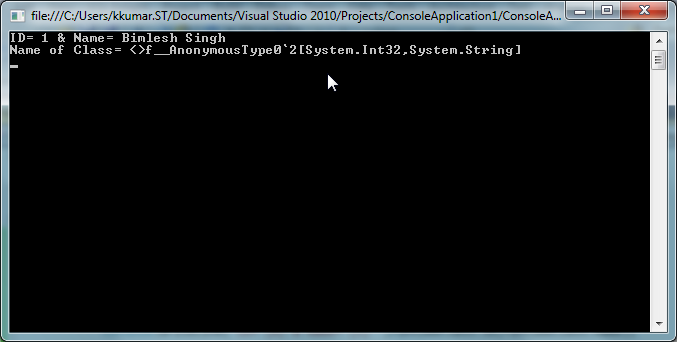
What is Anonymous Type in C#?

O/P

Code description:

var runtimeClass=new {ID=1,Name="Bimlesh"};

In this above line we store the object of class in a variable of type var and create the class with new key word without having a hardcoded class name.

Like any other class we can access the properties of Anonymous class by its object .

runtimeClass.Id=1;

runtimeClass.Name="Bimlesh";